A standard web screen single selection listbox.
Can have the following sub-nodes (actions):
Select Action - Action is invoked when an item is selected (see below as how to know which item)
On Load - specified action is invoked when the Listbox is created, the returned "list" is used to populate initial contents, for example the following will call the model "List Parts":

When an item is selected, the description, hidden key and list position are stored in the internal memory store as <name>.selectedValue, <name>.selectedKey and <name>.selected_id respectively, allowing these to be used as parameters in subsequent model invocations. (NOTE: selected_id is now deprecated).
For the data returned from an On Load, the name of attached items (or loaded items) is taken as the description, optionally, if the value of the attached children is filled in this will be stored as a key.
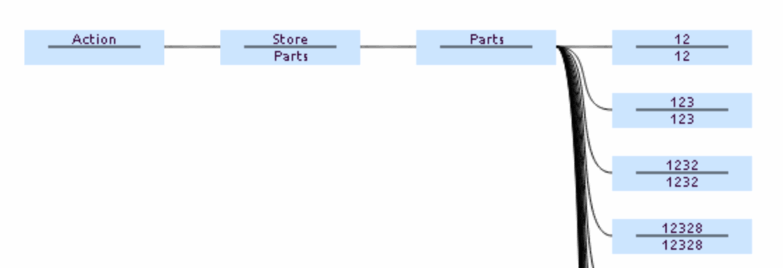
Assuming that On Load invoked a model, then the result from that model should be an Action graph, in the general case you wish to Store in a variable of the same name as the name of the listbox (so it updates), with the control name in the child name (as its a graph), and the child elements attached, the name element being what will be displayed, and the value being a key to identify that entry, for example (in this case the label and id as the same):
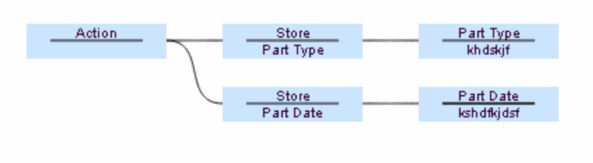
In the worked example above,, if when an item is selected in the listbox, the screen items Part Date and Part Type should be updated, the return from the Invoked Model should be structured as follows:
If the name is followed by a colon and a value, the value will be used as the number of lines for the listbox, if this is followed by a further colon and number, the second number will be used as the listbox width in pixels.
If the variable <name>.initialValue is set when the data is loaded, then this will be used as the default selected value. Note however this is the VALUE, i.e. the item on the bottom of the graph elements which are loaded into the control, also it needs to be set before the data is loaded, so if both are in an Action Graph, the Store of the the initialValue needs to be processed before that of the data load.
Styling may be applied by the use of CSS as required.