When you need to read or write to a data source, you first need to set up the data source under a name of your choice. This source name can then be used within the required Data Node, which will then use the connection details supplied.
When a model is moved from development, to test, and later production, using the same name for the different databases (in each environment), means the models can be moved without requiring any changes.
¶ Creating a Data Source
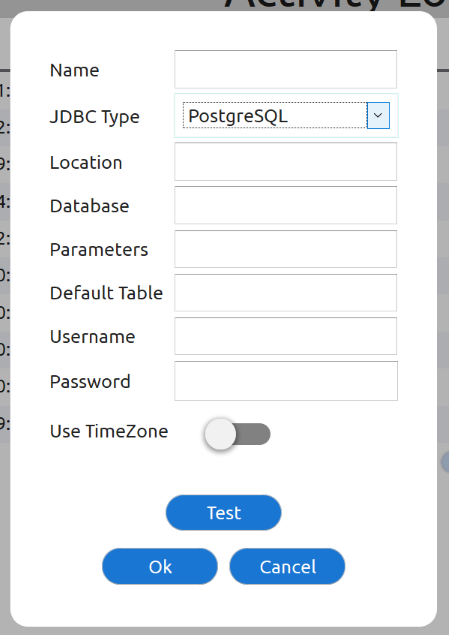
From the Model selection view (after login), select the Data Sources Tab. Here are listed any data sources already set up. Sources can be selected and edited or deleted, or new ones added. Adding a new source will present the following dialog window, each is described in the next section:
¶ External Sources
You will need the connection details from your DBA (Database Administrator).
- Name - the local name assigned to this data source
- Location - this is usually a DNS name and port, or IP address
- Database - The name of the database within the instance / at the location
- Parameters - (optional) Any additional JDBC connection parameters can be supplied here
- Default Table - The default table
- Username & Password - access details to the database specified
- Use Timezone - set this if the database is in a different timezone, but you wish to use local time (if set all times will be converted automatically both ways). This is very useful when times are automatically inserted into the database in a different timezone, but you wish to display the local equivalent.
The Test button will attempt to connect to the data source (validating the details) and query the structure of the table (validating the default table)
¶ Internal Data Tables
See DataTables.